Author: simplydigital.in

  • YouTube Brand Account Management & Analytics in 2026: The Complete Guide to Channel Success

    YouTube Brand Account Management & Analytics in 2026: The Complete Guide to Channel Success

    What exactly is a YouTube brand account, and why should you care about it in 2026?

    A YouTube brand account is a dedicated channel type that lets multiple team members manage one YouTube channel without anyone having to share login credentials. It’s designed specifically for businesses, creators, and organizations that want to build a serious presence on the platform—and honestly, if you’re not using one by now, you’re probably leaving money on the table.

    Let me explain why this matters so much, and how it connects to everything else you need to know about YouTube analytics, brand management, and actually growing your channel in a way that matters.

    Understanding YouTube Brand Accounts vs Personal Accounts

    Here’s the thing that trips up a lot of people: there’s a fundamental difference between a personal YouTube account and a brand account, and the distinction goes way deeper than just the name on the channel.

    A personal YouTube account ties everything to one Google login. Your channel lives and dies with that account. If the person who created it leaves your company? You’re in for a rough administrative nightmare trying to get access back. If they get locked out? Your entire channel goes dark. It happens more often than you’d think, and the costs are real.

    What makes a brand account different?

    A brand account is owned by a Google Brand Account rather than by a single person. Multiple people can manage it—editors, marketers, community managers, content strategists—each using their own Google login. Nobody shares passwords. Nobody compromises personal security. The channel belongs to the organization, not the individual.

    Think about this scenario: you’re running a SaaS company and your YouTube channel is being managed by four different people. Your video editor needs to upload content. Your community manager needs to respond to comments and manage engagement. Your marketing director needs to review YouTube Insights and Analytics to track performance. Your founder occasionally wants to record and upload something herself. Without a brand account, everyone either shares one login (security disaster) or several people can’t do their jobs properly. With a brand account? Everyone has exactly the access they need, nothing more, nothing less.


    Setting Up a YouTube Brand Account: The Step-by-Step Process

    Let’s walk through how to actually create a YouTube brand account, because getting this right from the beginning saves you headaches later.

    Step 1: Start with the Right Google Account

    You need an active Google account first. This could be a Gmail account, a dedicated business email, or a full Google Business Profile. Make absolutely sure you’re choosing an account you’ll keep long-term—ideally not a temporary email or a personal account that someone might close.

    If you’re setting this up for a company or organization, use an official business email that stays with the company, not someone’s personal Gmail. This is crucial because your initial ownership and permission structure gets linked to this account, and while you can add more people later, having the wrong starting point creates complications down the line.

    Step 2: Sign In and Create Your Brand Account

    Sign into YouTube using the Google account you want as the primary owner. Then navigate to your account settings and look for the option to create a brand account. Google has simplified this interface significantly, so it should be relatively straightforward.

    Once you create the brand account, this account becomes the initial owner. You can add more owners later, but start with one person who absolutely has to maintain access to the company email address associated with it.

    Step 3: Add Managers and Set Permission Levels

    Here’s where brand accounts shine—the granular permission system.

    You can assign people different roles:

    • Primary Owner: Complete control. Can add or remove other owners and managers. Handles the most sensitive account decisions.
    • Owner: Full control, including ability to add or remove managers. Usually limited to a few key people.
    • Manager: Can upload, edit, and manage content, but can’t change ownership or access sensitive account settings.
    • Communications Manager: Can respond to comments and manage community interaction, but can’t upload videos or change settings.

    This role-based access means your social media manager can engage authentically without accidentally changing your channel layout. Your video editor can upload without being able to alter billing information. Your community team stays focused on what they do best.


    Why YouTube Analytics and Insights Matter More Than Ever in 2026

    Here’s what most content creators and brand managers get wrong: they focus on views. Just… views. Raw numbers going up.

    But YouTube Insights and YouTube Analytics tell you a completely different story. They answer the questions that actually matter.

    What exactly are YouTube Analytics?

    YouTube Analytics is your dashboard for understanding everything about your channel’s performance. It’s the data layer that sits underneath every decision you should be making about your content strategy.

    Watch time. Viewer demographics. Traffic sources. Audience retention rates. Click-through rates on thumbnails. Audience sentiment (likes vs. dislikes, though YouTube removed the public dislike count). Subscriber growth patterns. Revenue if you’re monetized.

    This isn’t vanity metrics. This is operational intelligence.

    Why should you care about your audience retention rate?

    Imagine you upload a 10-minute video and YouTube Insights shows that viewers stick around for 2 minutes, then leave. That’s data telling you something critical: your hook isn’t working, or the content strategy shifted too far away from what your audience came for.

    Now compare that to a video where 70% of viewers make it to the 8-minute mark. Same length, completely different story. YouTube’s algorithm sees that retention signal and starts recommending it to more people. The algorithm loves watch time. It’s the currency of the platform.

    How do audience demographics impact your strategy?

    YouTube Insights breaks down who’s watching: age, gender, geography, interests. If you’re marketing to women aged 25-34 but your analytics show 60% of your audience is men over 45? Your entire content strategy might be out of alignment with reality.

    This is why brand management and YouTube Analytics have to work together. Your brand positioning should match who’s actually showing up to watch your content.


    The Four Mistakes That Kill YouTube Success (And How to Avoid Them)

    Brand management mistakes online don’t just look bad—they actively sabotage your growth. Here’s what we see destroying channels in 2026.

    Mistake #1: Low-Quality, Inconsistent Visual Branding

    You know what kills credibility faster than almost anything? Uploading a video with a crisp thumbnail one week and a blurry, low-contrast one the next week. A logo in one video, no logo in another. Channel art that doesn’t match your website.

    The internet has trained people to judge brands in milliseconds. YouTube Insights data shows that your click-through rate on thumbnails directly impacts which videos the algorithm recommends. A 4% CTR vs a 2% CTR is the difference between exponential growth and stagnation.

    How to fix this: Invest in brand guidelines first. Before you upload one video, document exactly how your thumbnails should look, what font you’re using, what color palette governs your visuals. Make these guidelines accessible to everyone creating content. If you’re a team, this is non-negotiable.

    Mistake #2: Neglecting Your Community (And Then Wondering Why Engagement Is Dead)

    Here’s the brutal truth: posting videos and disappearing is a strategy for building a graveyard, not a community.

    From a viewer’s perspective, an inactive YouTube channel—one where comments pile up unanswered and community posts sit ignored—signals that your brand doesn’t care. You stopped showing up. Why should they?

    YouTube Analytics tracks community engagement metrics. Comments, replies, shares. When your engagement rate drops, YouTube takes that as a signal that your content isn’t resonating. The algorithm pushes it less. Fewer people see it. Growth flattens.

    How to fix this: If you’re going to open a YouTube channel, commit to managing it. Add a Communications Manager role to someone on your team. Respond to comments. Create community posts. Ask your audience what they want to see next. Make it clear that this is a living, breathing community, not a broadcast center.

    Mistake #3: Uncontrolled Brand Materials and Message Inconsistency

    This one gets teams in real trouble. Without a centralized system for managing your brand assets and guidelines, what happens?

    Someone reuploads an old version of your logo. A team member in one region uses messaging that contradicts what your head office is saying. Your channel description talks about one value proposition, but your video intros emphasize something completely different.

    Viewers start noticing the inconsistency. They question whether you actually stand for what you say you stand for. Google’s algorithm doesn’t penalize inconsistency directly, but it does penalize engagement drops—and inconsistent branding tanks engagement.

    How to fix this: Create a single source of truth for all your brand materials. Video descriptions. Logos. Messaging templates. Thumbnail guidelines. Everything lives in one place. Everyone accessing the same current version. No outdated assets floating around.

    Mistake #4: Ignoring What Actually Drives Results in Your YouTube Insights

    This is the big one that separates successful channels from unsuccessful ones.

    You upload 50 videos. YouTube Analytics tells you exactly which ones work and which ones don’t. Watch time. Audience retention. Traffic sources. Viewer behavior. It’s all there.

    And then… many creators just keep making videos the same way, ignoring the data completely.

    If your YouTube Analytics shows that tutorials drive 3x the watch time of opinion pieces, why are you still spending time on opinion content? If audience retention drops 40% after the 3-minute mark, your videos are too long. If 60% of your traffic comes from YouTube Search (not recommendations), you need to optimize for search intent, not algorithmic luck.

    How to fix this: Treat YouTube Analytics like a product roadmap. Every week, spend 30 minutes actually reviewing the data. Not just looking at it—understanding it. What worked? What didn’t? What’s the pattern? Then build next month’s content strategy around what the data is telling you.


    How YouTube Brand Accounts Strengthen Your Overall Brand Management Strategy

    This is where the pieces come together.

    A YouTube brand account is not just a logistics feature. It’s a foundational part of your broader brand management system.

    Unified Team Access Without Compromising Security

    Brand accounts let your team move faster without security theater. Everyone has the right access for their role. No password sharing. No over-permissioning. When someone changes roles or leaves the company, you revoke access instantly. The channel stays operational. Your brand stays secure.

    This is what brand management looks like in 2026—structured governance with operational flexibility.

    Building a Scalable System

    As your team grows, your YouTube operation scales with it. New editors come on board. You add community managers. You expand to different regions. With a brand account structure in place, all of this happens without chaos. Clear roles. Clear responsibilities. Clear escalation paths.

    Maintaining Brand Consistency Across a Growing Channel

    YouTube Insights shows you’re reaching 500,000 monthly viewers and growing. Your team doubles. You add regional teams. Without clear brand governance built into your YouTube Brand Account structure, consistency starts falling apart.

    With it in place? You’ve already documented how things work. Roles are defined. Guidelines exist. New team members onboard into a system, not chaos.


    YouTube Analytics in 2026: The Metrics That Actually Matter

    Let me cut through the noise and tell you what metrics in YouTube Analytics you should actually be monitoring.

    Watch Time and Average View Duration

    Watch time is the currency of YouTube’s algorithm. The platform wants people spending time watching videos. It recommends videos with high watch time to more people.

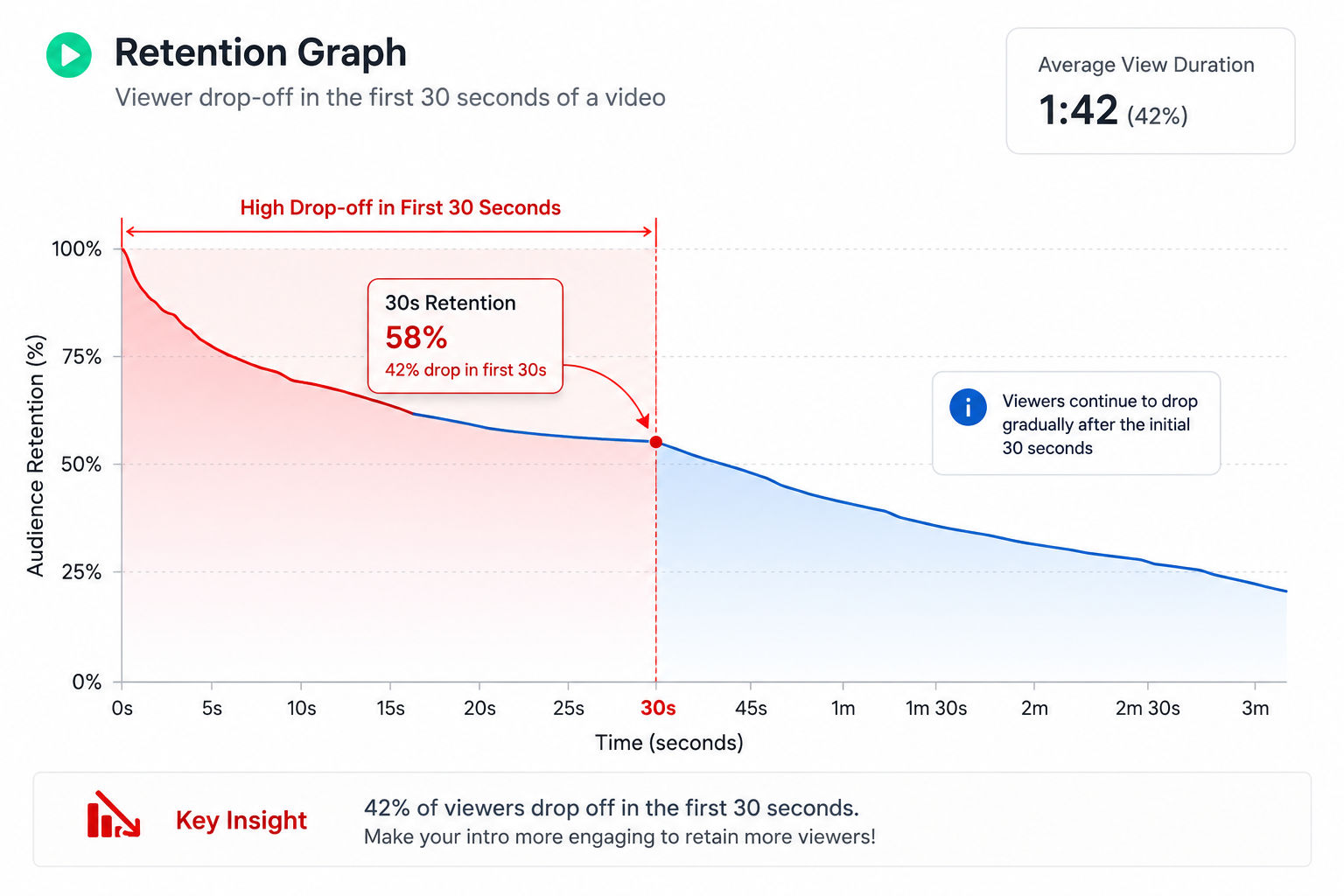
    Average view duration tells you when people leave. If it’s much lower than your video length, something’s wrong with your hook or pacing.

    Audience Retention Curve

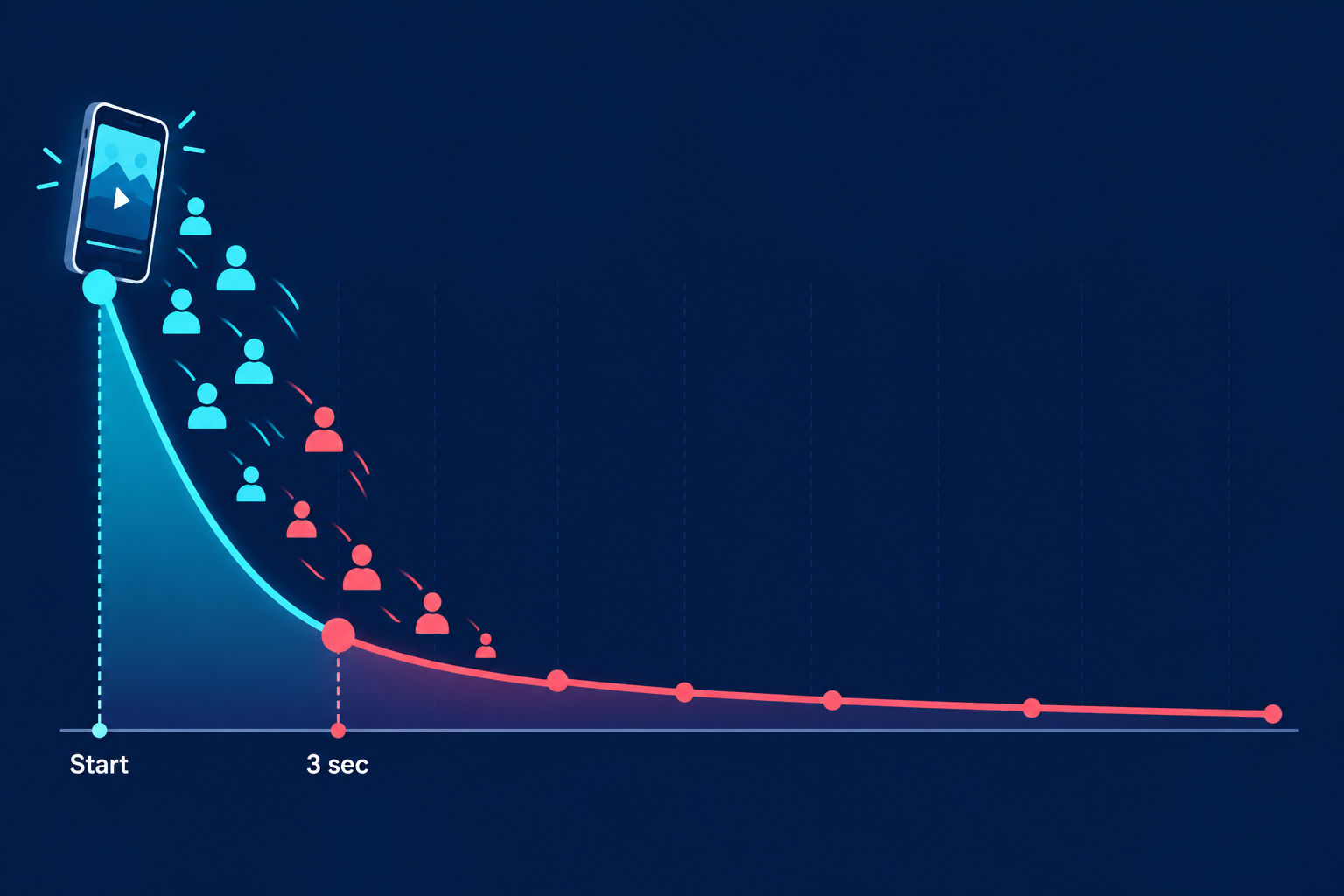
    YouTube Analytics shows a graph of when viewers drop off. The first 10 seconds matter disproportionately. Many videos lose 30-40% of viewers in the first 3 seconds. If your curve is flatlining early and dropping steeply, your opening isn’t compelling.

    Click-Through Rate (CTR) on Thumbnails

    YouTube Search and recommendations show your thumbnail to people. CTR measures what percentage click through to watch.

    A typical CTR is 2-4%. If you’re consistently below 2%, your thumbnails aren’t enticing. If you’re above 5%, you’ve figured something out—analyze that thumbnail and use it as a template.

    Traffic Source Breakdown

    Is your traffic coming from Search? Recommendations? Browse features? External websites?

    Each source tells you something different about your content:

    • Search traffic = your content answers specific questions people are asking
    • Recommendations = your content appeals broadly and the algorithm likes it
    • Browse features = you’re building consistent viewership from subscribers
    • External traffic = your promotion strategy is working

    Audience Demographics and Interests

    YouTube Analytics breaks down age, gender, geography, and interest categories. If there’s a massive gap between who you’re marketing to and who’s actually watching, your brand positioning needs to shift.


    The Role of YouTube Brand Accounts in Data-Driven Content Strategy

    Here’s the connection that most brands miss: YouTube Brand Accounts don’t just handle permissions. They create the governance structure that allows data-driven decision-making to actually happen.

    Why?

    Because clear roles mean clear accountability. Your analytics manager knows they own YouTube Insights reviews. Your content strategist knows they own the content calendar. Your editor knows they own uploads. Each person understands what data matters to their role.

    When responsibility is scattered—when three people have owner-level access and no one owns insights—accountability disappears. Data gets ignored. Decisions get made on intuition instead of evidence.

    A brand account structure forces alignment. It creates the organizational conditions where YouTube Analytics actually influences decisions, rather than becoming theater.


    Bringing It All Together: YouTube Brand Accounts + Analytics + Brand Management

    Here’s what 2026 brand success looks like on YouTube:

    You create a brand account with clear roles. Your team knows who can do what. Your content editor uploads optimized videos with consistent branding. Your community manager engages with every meaningful comment. Your analytics lead reviews YouTube Insights every week and shares insights with the strategy team.

    Your YouTube Analytics shows that longer-form tutorial content drives 3x the watch time of short-form content. So you shift your production calendar to focus there. Within two months, your watch time per video climbs 150%. The algorithm notices. Recommendations increase. Growth accelerates.

    Your channel hits 100,000 subscribers. A team member leaves. Instead of crisis management, you simply revoke their access in your brand account settings. The channel operates without interruption. New team members come on board. They log in with their own credentials, and brand guidelines are waiting for them.

    This isn’t magic. It’s just competent systems thinking applied to YouTube.


    FAQ: YouTube Brand Accounts and Analytics Questions Answered

    Q: Is a YouTube brand account free?

    A: Yes. Completely free. Creating and maintaining a brand account costs nothing. It’s just a way of organizing who has access to what.

    Q: Can I convert a personal channel to a brand account?

    A: YouTube has made this easier over time, but the process varies. In general, it’s cleaner to start with a brand account if you’re serious about growth. If you already have a successful personal channel, you can transition, but it requires careful planning.

    Q: How many people can I add to a brand account?

    A: As many as you need. You can have multiple owners, multiple managers, and multiple communications managers. The permission structure scales with your team.

    Q: What happens to my YouTube Analytics if I switch from a personal to a brand account?

    A: The data stays. The videos stay. Your history stays. Only the ownership structure changes. YouTube Analytics continues where it left off.

    Q: Which YouTube Analytics metrics should I focus on first?

    A: Start with watch time, audience retention, and traffic sources. These three metrics tell you whether your content is working and how it’s reaching people. Everything else builds from there.

    Q: How often should I review YouTube Analytics?

    A: Weekly is ideal. You don’t need deep dives every single day, but a 30-minute weekly review keeps you connected to what’s working and what isn’t. Monthly reviews risk missing patterns that weekly reviews would catch.

    Q: Can my team access YouTube Insights from their phones?

    A: Yes. YouTube has mobile apps for both iOS and Android. Your team can check YouTube Insights and respond to comments from anywhere.

    Q: What’s the difference between YouTube Insights and YouTube Analytics?

    A: These terms are often used interchangeably. YouTube Insights typically refers to the key metrics you see in your dashboard (watch time, subscribers gained, estimated revenue). YouTube Analytics is the broader system of all available data. In practice, most creators use both terms to mean the same thing.

    Q: If I have a brand account, do I lose any YouTube features?

    A: No. Brand accounts have full access to monetization, creator studio, shorts, live streaming, channel memberships, super chat, and everything else. No features are restricted for brand account users.

    Q: How do I ensure my team follows brand guidelines when uploading?

    A: Document everything. Put your guidelines in a shared location. Make them visual, not just words. During onboarding, walk new team members through the guidelines. Have a quick checklist they run through before publishing. Make compliance easy by making it clear.


    Final Thoughts: The 2026 Reality of YouTube Success

    YouTube brand management in 2026 is not complicated. It’s systematic.

    Create a brand account. Organize your team. Document your brand guidelines. Review your YouTube Analytics weekly. Make decisions based on data. Iterate. Grow.

    The brands winning on YouTube right now are the ones that got the fundamentals right and stayed consistent. Not flashy. Not lucky. Just systematic.

    Start there. Everything else follows.


    Last updated: April 2026

  • Your YouTube Comments Are Telling You Something. Are You Actually Listening?

    Your YouTube Comments Are Telling You Something. Are You Actually Listening?

    Why YouTube Comment Sentiment Analysis is the growth lever most channels are leaving untouched — and how to use it for content, marketing, and a lot more.

    Picture this.

    You just published a YouTube video. It’s been up for a week. The view count is decent, the watch time looks okay, and you’ve got a few hundred comments sitting at the bottom of the page.

    And what does your team do with those comments?

    Scroll through a few. Reply to the obvious ones. Maybe flag a complaint. Then move on.

    Here’s the uncomfortable truth: in those comments is a goldmine of audience intelligence that most brands, creators, and marketing teams completely ignore. People are telling you exactly what they liked, what confused them, what they want to see next, and whether they trust you enough to buy from you.

    But without a proper YouTube comment sentiment analysis system, all of that signal disappears into the noise.

    Let’s change that.

    The Problem: Your Audience Is Giving You Free Research. You’re Not Using It.

    Think about how much money brands spend on market research. Focus groups, surveys, brand tracking studies — it adds up fast.

    And yet?

    Every single day, your YouTube audience is sitting in your comment section telling you, unprompted and for free, exactly what they think. What they feel. What they need. What they don’t understand. What made them hit subscribe — or close the tab.

    The problem isn’t that the data doesn’t exist.

    The problem is that reading through thousands of comments manually is impossible. And even when teams try, they’re reading for tone and context — not categorising systematically, not tracking patterns over time, not connecting comment intelligence to content decisions or marketing strategy.

    So the data sits there. Valuable and completely untapped.

    And your next video? Briefs based on gut feel. Your email campaigns? Written without knowing what your actual viewers care about. Your creator partnerships? Chosen on subscriber count rather than real audience signals.

    Sound familiar?

    The Promise: What If You Could Hear Your Entire Audience at Once?

    Here’s what a proper YouTube comment sentiment analysis tool actually does for you.

    It reads every comment. All of them. Automatically. And instead of just sorting them into “positive” and “negative,” it maps each one to something much more useful — where the viewer is in their relationship with you, and what they actually mean by what they’re saying.

    Awareness comments. Consideration signals. Purchase intent. Trust signals. Objections. Love. Confusion. Requests.

    All surfaced. All searchable. All connected to which videos generated them.

    That’s not just a nice-to-have. That’s the difference between guessing what your audience wants and actually knowing.

    YouTube comment sentiment analysis matrix showing funnel stage and sentiment breakdown on a dashboard
    Every comment placed into context — what your viewer feels, and where they are in their journey.

    So How Does It Actually Work? Here’s the Full Picture.

    Lumetrics uses natural language processing to analyse every comment on your YouTube channel and map it across what we call a 3×3 intelligence matrix.

    The rows represent funnel stage:

    • Awareness — viewers who are just discovering your brand or topic
    • Consideration — viewers who are weighing up whether they want more from you
    • Purchase Intent — viewers who are ready to act, buy, subscribe, or engage at a deeper level

    The columns represent sentiment:

    • Positive — things they loved, what resonated, what they want more of
    • Neutral — questions, observations, or ambivalent responses
    • Negative — objections, frustrations, confusion, or complaints

    Every single comment ends up in one of those nine cells. And the patterns that emerge from that? That’s where the real value lives.

    Let’s look at the use cases. Because this goes way beyond “knowing how your viewers feel.”

    Use Case 1: Plan Your Next Video — Using What Your Audience Already Asked For

    This one is the most obvious. But it’s wildly underused.

    Inside every comment section, buried between the “great video!” replies and the spam, are real questions that your actual audience is asking about topics you cover. Questions they have after watching your video. Things they wanted more depth on. Adjacent topics they mentioned.

    With YouTube comment sentiment analysis, you can surface all of those automatically.

    Here’s the workflow: You post a video on, say, how to choose term insurance. The comment section fills up. Your sentiment tool scans it and tells you: 47 comments from Consideration-stage viewers have a Neutral or Negative sentiment around “premium payment flexibility.”

    That’s your next video. Right there.

    You’re not guessing what the audience wants. You’re reading the brief they wrote for you — without knowing that’s what they were doing.

    The best content briefs don’t come from brainstorms. They come from your comment section.

    Use Case 2: Fix What’s Not Landing — Before You Lose the Audience

    Here’s a use case that saves a lot of wasted spend.

    You’ve published a series of videos. Watch time looks okay on the surface. But your Consideration-stage Negative comments keep mentioning the same thing — let’s say your explanations are too technical, or the pace is too fast.

    Without comment sentiment analysis, you wouldn’t necessarily notice this pattern. You’d just see that the series isn’t growing as fast as you hoped, and you’d shrug and try something different.

    With it? You catch the issue, adjust the format, and retain the audience you’ve already built.

    Think of it as a real-time feedback loop. Every video teaches you something. The question is whether you’re actually learning it.

    Use Case 3: Rewrite Your Email Campaigns Using the Language Your Audience Actually Uses

    This one surprises people.

    Here’s the thing: most email marketing copy is written by marketers, using marketing language, about features that marketers think are important. It’s polished. It’s professional. And it often lands completely flat because it doesn’t sound like how real people talk about the problem.

    Your comment section does sound like how real people talk.

    When you run YouTube comment sentiment analysis at scale, you start to see the phrases, questions, and frustrations that your actual audience uses. The way they describe their problem. The words they use to explain what they want. The emotional language around their decision.

    That language belongs in your emails. In your ad copy. In your landing page headlines.

    Your next campaign’s best headline is probably sitting in your comment section right now, waiting to be found.

    The words your audience uses in comments? They belong in your email subject lines.

    Use Case 4: Build a Better Product — From Feedback You Didn’t Have to Ask For

    This one is underrated. Especially for D2C brands, SaaS companies, and financial services businesses that use YouTube as an education and trust-building channel.

    People comment on YouTube with the kind of candour they rarely show in formal surveys or support tickets. They say what they actually think. They ask the questions they’re too embarrassed to ask a sales person. They describe their problem in raw, unfiltered terms.

    For a product team, that’s research gold.

    Comments in the Consideration stage with Negative sentiment often contain the exact objections that are stopping people from buying. Fix those — in the product, not just the messaging — and your conversion rate goes up.

    Comments in the Awareness stage with Positive sentiment often point to which problems your product solves that you’re not even talking about in your marketing yet. That’s a positioning opportunity.

    YouTube comment sentiment analysis connects your product team to your audience in a way that most feedback mechanisms completely miss.

    Use Case 5: Know What Competitors’ Audiences Want — Before They Figure It Out

    Here’s where it gets really interesting.

    You can run comment sentiment analysis on competitor channels too.

    Not to copy them. To understand what their audience is asking for that they’re not delivering. The gaps in their content. The questions they’re not answering. The frustrations their viewers are vocalising in the comment section, video after video, with nobody responding.

    Those are your content opportunities. Those are the videos you make. Those are the keywords you target.

    If your competitor has 200 comments across their last ten videos asking variations of “but how does this work for small businesses?” — and they’re not making that video — you are.

    That’s what good YouTube comment sentiment analysis enables when you combine it with competitive intelligence.

    The best competitive intelligence is already sitting in your competitor’s comment section.

    Use Case 6: Train Your Sales and Support Teams

    This one almost never comes up in YouTube strategy conversations. But it should.

    Your sales team spends a lot of time handling objections. Your support team answers the same questions over and over. Both of them are working from their own collective memory of what customers say — which is useful, but limited.

    Your YouTube comment section, analysed at scale, gives you a systematic view of what people actually worry about, misunderstand, and push back on. In volume. Across thousands of interactions.

    Export the top Consideration-stage Negative comments from your last quarter of videos, and you’ve got a real-time objection map. Hand it to your sales team. Build it into your support FAQ. Use it to write your next series of explainer videos.

    This is cross-functional intelligence — and most brands have no idea it’s available to them.

    How Lumetrics Makes This Possible

    Lumetrics is a YouTube intelligence platform — and comment sentiment analysis is one of its most powerful modules.

    Here’s what happens when you connect your channel:

    Every comment across every video gets pulled in and processed through our NLP engine. It gets mapped to a funnel stage and a sentiment category. The top objections surface automatically. The most-loved moments get flagged. The emerging topics get highlighted.

    All of it is available in a clean dashboard that your content team, your marketing team, and your product team can all work from.

    And it does this in ten languages — including English, Hindi, and Arabic — so brands operating across multiple markets can get sentiment intelligence from every audience they have, not just their English-speaking viewers.

    No spreadsheets. No manual reading. No more “we’ll get to the comments next week.”

    Lumetrics analyses every comment automatically — funnel stage, sentiment, objections, and emerging topics.

    Why This Matters for Growth — Not Just Data

    Let’s come back to the big picture for a second.

    YouTube growth doesn’t happen because you post consistently. It happens because you post the right things, for the right audience, in a way that makes people feel genuinely understood.

    The channels that grow the fastest aren’t necessarily the ones with the biggest budgets or the best production quality. They’re the ones that know their audience deeply. The ones that make a video and have viewers say “it’s like they read my mind.”

    That feeling doesn’t come from guessing. It comes from listening.

    YouTube comment sentiment analysis is, at its core, a listening tool. A systematic, scalable way of hearing every person who takes the time to engage with your content — and turning what they say into your next strategic move.

    Whether that’s a new video, a better email, a stronger product page, a tighter sales script, or a content gap that your competitor hasn’t noticed yet.

    Want to Hear What Your Audience Is Really Saying?

    You can start right now, for free.

    Lumetrics offers a free Chrome extension — the YouTube Comments Insights extension — that you can install on any YouTube video, no account required. In under two minutes, you’ll see a real-time sentiment breakdown and the top signals from that video’s comment section.

    Or if you’re ready to see what this looks like across your entire channel — with full funnel mapping, competitor comment intelligence, and cross-video trend analysis — we’d love to show you a personalised demo using your own channel data.

    No generic walkthrough. Your videos. Your audience. Your data.

    Ready to turn your comment section into your best content strategist?

    [Try the Free Comments Insights Extension →]

    Add to Chrome Extension

    Or book a personalised demo for your team.


  • You’re Posting on YouTube Every Week — But Do You Actually Know What’s Working?

    You’re Posting on YouTube Every Week — But Do You Actually Know What’s Working?

    A honest look at why most brands are flying blind on YouTube, and how the right YouTube analytics tool changes everything.

    Let’s be honest for a second.

    Your team is putting out YouTube content consistently. You’ve got a production process, a posting schedule, maybe even a dedicated creator or an agency on retainer. But when someone in the boardroom asks “how is our YouTube channel actually performing?” — what do you say?

    If your honest answer involves downloading a CSV from YouTube Studio, cross-referencing it with something from another tool, and trying to piece together a story from metrics that don’t quite connect — you’re not alone. And you’re not failing. You’re just working without the right YouTube analytics tool.

    That’s exactly what this post is about.

    The Problem: YouTube Is the World’s Second Biggest Search Engine. Most Brands Treat It Like a Content Dump.

    YouTube has over 2.5 billion logged-in users every month. It’s the second-largest search engine on the planet, right after Google. People go there to learn, to research products, to decide which brand they trust — and yes, to figure out whether your insurance policy, skincare product, or SaaS tool is worth their money.

    And yet, most brands have very little idea what’s actually happening on their channel. They know their subscriber count. They can see which videos got the most views. But that’s where the intelligence stops.

    They don’t know:

    • Why one video performed three times better than the last one
    • What their audience is actually saying in the comments — beyond the obvious
    • Whether their competitors are eating their lunch on the keywords that matter
    • Which creators would actually fit their brand if they wanted to run a campaign
    • Where exactly viewers are tuning out in the middle of a video — and why

    This isn’t a content problem. It’s a data problem.

    And data problems have data solutions.

    One single dashboard for YouTube Insights

    The Promise: A YouTube Insights Tool That Actually Gives You the Full Picture

    What if you had a single YouTube insights tool that told you — with real clarity — what’s working, what’s not, who your audience really is, and what your competitors are doing on YouTube right now?

    Not in five different tabs. Not after three exports and a pivot table. Just: here’s what’s happening, here’s why, here’s what to do.

    That’s what we built Lumetrics to do.

    Lumetrics is a YouTube intelligence platform. It’s built for marketing teams, content strategists, enterprise brands, digital agencies, and creators who are serious about YouTube — not just present on it. The whole idea is simple: stop guessing, start knowing.

    Here’s a look at what that actually means in practice.

    What Lumetrics Does: A Preview of Your New YouTube Intelligence Stack

    1. YouTube Ranking Intelligence — The First Tool That Tells You Where You Actually Stand

    Most YouTube analytics tools show you what happened on your own channel. Lumetrics shows you where you stand relative to the entire landscape.

    Think of it like organic search ranking — but for YouTube. You can see which keywords your brand ranks for, how your position compares against competitors, and what it would take to move up. No other YouTube insights tool does this the way Lumetrics does.

    For brands operating across multiple markets or categories, this is transformative. Instead of guessing whether your YouTube content is visible to the right audience, you know — keyword by keyword, category by category.

    YouTube Ranking tool

    2. Competitive Intelligence — Know What Your Rivals Are Doing Before Your Audience Does

    You can’t outperform competitors you can’t see.

    Lumetrics tracks up to 4 competitor channels in real time. You get a clear picture of what keywords they’re winning, how often they’re posting, which topics they’re covering that you’re not, and where their share of voice is growing in your category.

    The Share of Voice module, for instance, shows you the percentage of impressions your brand commands in your category — compared to every competing channel. When a competitor’s number goes up, yours goes down. Now you know why.

    This is the kind of competitive intelligence that used to take a team of analysts days to compile. With Lumetrics as your YouTube analytics tool, it updates automatically, every six hours.

    3. Comment Sentiment Analysis — What Your Viewers Are Actually Saying

    Here’s something most brands completely ignore: your comment section is one of the most valuable research assets you have. It’s your audience telling you, completely unprompted, what they think about your content, your brand, your product, and your competitors.

    Lumetrics reads every comment using natural language processing and maps it across a 3×3 intelligence matrix: funnel stage (Awareness, Consideration, or Purchase intent) crossed with sentiment (Positive, Neutral, or Negative).

    What comes out is genuinely actionable. You can see:

    • Which topics your audience loves and comes back to
    • What objections or concerns keep appearing at the Consideration stage
    • What’s converting people from viewers into intent signals
    • Which messages are landing — and which are falling completely flat

    This is your YouTube insights tool doing the research your team doesn’t have time to do manually — across thousands of comments, automatically, across every video on your channel.

    4. YouTube SEO Audit — Stop Publishing Videos That Nobody Can Find

    Publishing on YouTube without optimising for search is like opening a shop and leaving all the lights off.

    Lumetrics runs a full YouTube SEO (YSO) audit on any video or channel. It checks across eight dimensions — title keyword placement, description density, tag relevance, thumbnail click-through rate estimation, chapter markers, captions, and more — and gives you a 0–100 score with a prioritised fix list.

    Not just “your score is 68.” Specifically: your description keyword density is underperforming, here’s what to fix first because it’ll have the biggest impact on discoverability.

    This is the kind of detail that most generic YouTube analytics tools skip over entirely. Lumetrics makes it actionable.

    5. Creator Research & Vetting — Find the Right People for Your Campaign

    If your brand works with YouTube creators — or is thinking about it — the biggest risk is picking the wrong person. Subscriber count is not a measure of influence. It’s a vanity metric.

    Lumetrics gives you a Creator Research module that evaluates potential collaborators on what actually matters: engagement quality, audience authenticity scores, and brand alignment. You can compare creators side by side and build a shortlist with confidence rather than crossing your fingers and hoping.

    For brands spending serious money on creator partnerships, this feature alone pays for itself many times over.

    6. Content Creation Intelligence — Know What to Make Before You Make It

    One of the most expensive mistakes in content marketing is making the wrong video. You spend the budget, the production time, the editing hours — and then the video lands flat.

    Lumetrics’s content intelligence module analyses the top-performing videos in your category and surfaces the patterns: which hook styles drive retention, which video formats perform best, which topics are gaining momentum, which publish windows get the most organic reach.

    Your content team gets a data-backed brief before they even start writing a script. And your creative budget stops being a gamble.

    Who Is Lumetrics Built For?

    The short answer: anyone who takes YouTube seriously.

    More specifically:

    Enterprise marketing teams who need one unified workspace that gives every market, every brand, and every department the intelligence they need — without 14 different logins and zero synthesis.

    Digital agencies who want to deliver a proprietary YouTube intelligence layer to their clients — with white-label options that carry your branding, not ours.

    Growing brands and D2C companies who are investing in YouTube as a serious growth channel and need more than YouTube Studio’s built-in reporting to make good decisions.

    YouTube creators — especially those building channels for business, education, or brand growth — who want to understand their audience and their category with the same depth enterprise teams do.

    Lumetrics also offers two free Chrome extensions — the YouTube SEO Auditor and the Comments Insights extension — that anyone can install and use on any YouTube video, without creating an account. Think of it as dipping your toes in before you dive.

    Why Most YouTube Analytics Tools Fall Short (And What Makes Lumetrics Different)

    There are a lot of tools in this space. TubeBuddy, VidIQ, Brandwatch, Tubular Labs — they each do some things well. But here’s the honest reality: most of them solve one layer of the problem.

    TubeBuddy and VidIQ are great for individual creator SEO optimisation. Brandwatch is strong on social listening broadly. Tubular Labs has depth on industry benchmarking. But none of them synthesise competitive intelligence, comment NLP, creator research, content strategy intelligence, and YouTube ranking data into a single workspace.

    Lumetrics does all of it — and it does it with an enterprise-grade infrastructure that includes RBAC access controls, SSO integration, SCIM provisioning, multi-brand workspaces, and white-label options.

    In other words: it’s not just a YouTube insights tool for individual creators. It’s a YouTube intelligence operating system for organisations.

    The Bottom Line

    If you’re putting time, money, and creative energy into YouTube — you deserve to know whether it’s working. Not sort of know. Not roughly know. Actually know.

    You deserve a YouTube analytics tool that shows you where you rank, why you rank there, what your audience thinks, what your competitors are doing, and what your next video should be — all in one place.

    That’s what Lumetrics was built to be.

    The good news? You don’t have to take our word for it. Our free Chrome extensions are available right now — no account, no credit card. Install the YouTube SEO Auditor on your next video and see what it surfaces. Or install the Comments Insights extension on a competitor’s video and see what your future customers are actually saying about their content.

    If you like what you see, we’d love to show you the full platform — with your own channel data, your own competitors, your own market. No generic demo. Just your numbers.


    Ready to see what your YouTube channel is actually doing?

    Start Free — No Credit Card Required – Sign up →https://app.lumetrics.co

    Or add our free Chrome extension and get your first insight in under two minutes.

    Add YouTube SEO Auditor to Chrome — Free

    https://chromewebstore.google.com/detail/injmglapifjegojjdojaphjgodbbkdmb?authuser=0&hl=en


    Add YouTube Comments Sentiment Analyser to Chrome – Free

    https://chromewebstore.google.com/detail/kdbldhcchhomfbdhplfogbfibjjnjpjb?authuser=0&hl=en


    \